Welcome to Elderfield Manga Mode Graphics Setting
High-contrast black and white for a Junji Ito ink town. Not a difficulty.
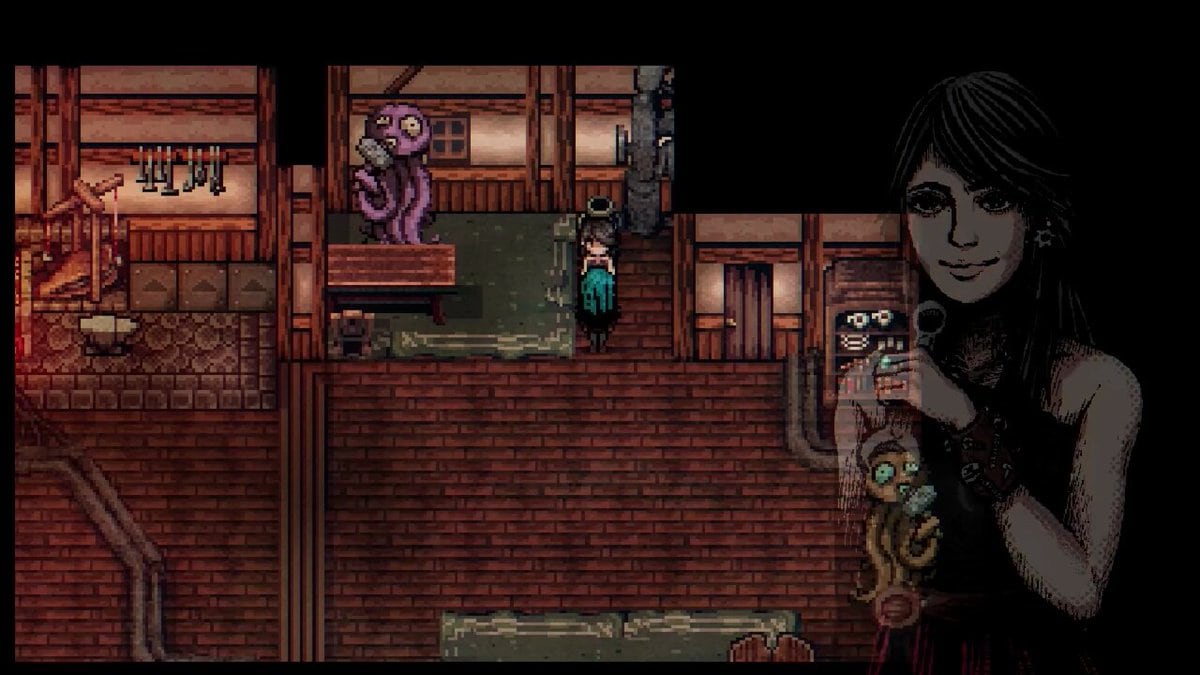
Manga Mode is a graphics toggle in Welcome to Elderfield, not a second game. It paints the pixel town in high-contrast black and white so the streets, farm, and mall look closer to the Junji Ito horror manga that already shapes the portraits. Chris Cote added it to the Graphics settings around demo build v0.6.4. Steam lists Color Alternatives among the store’s accessibility tags, which is the bucket this filter belongs in. Dated’s dark lofi still plays under it. The game remains a single-player cozy horror farming RPG. The full PC build is dated September 10, 2026. The Steam demo has been playable since October 2024.
If you came here from Getting Started, finish the house loop first: bed, bath, kitchen, then this filter. Manga Mode will not plant wheat. It will not teach Z and X. It will change how ink sits on the screen while you do those chores.
How to turn it on
Open Settings from the title screen or the in-game menu. Find Graphics. Enable Manga Mode. The changelog text from v0.6.4 is blunt: turn it on if you want to feel like a horror manga character. There is no extra slider for ink thickness, no panel-border overlay, and no separate save flag. The same file, the same farm, the same Tax Man. Flip it off the same way if the high contrast bothers a daytime watering run.
The same patch also printed version info on the title screen. Use that number. If your demo predates v0.6.4, the Graphics page will not mention manga at all. Update the Steam demo, then look again. Do not hunt a hidden shrine for a filter that lives in a menu.
Mouse, keyboard, and gamepad still follow the controls page. Turn-in-place changed in that same v0.6.4 drop: hold Control, LT, or RT instead of tapping a direction to pivot. That is a bind change, not a Manga Mode change. If facing a plot feels cursed after you enabled ink, you probably need the new turn lock, not a graphics rollback.
What the filter actually does
Color drains. Contrast climbs. Portraits that already wore Ito-style line work read as plates from a tankobon. Pixel tiles keep their silhouettes; the autumn gold and mall fluorescent wash go away. Shoppers, scarecrows, and tentacles become graphic-novel shapes instead of seasonal sprites. On a Steam Deck or an OLED panel the extra contrast is the point: blacks sit, whites pop, and the town stops competing with a washed mid-tone farm.
The official channel’s Manga Mode clip is the right preview. It is a look, not a boss guide. Watch it once, then decide whether you want that ink for a whole week or only for screenshots. PrintScreen still captures whatever the current filter is showing, which is useful if you want a black-and-white Tax Fog shot for a friend.
Dated’s score does not swap to a different album. The lofi stays dark and close. That pairing is why the setting works: the music was already drawing in graphite, and the filter finally lets the picture agree.
What it does not do
Manga Mode is not a difficulty. Cozy, Normal, and Nightmare still sit on their own menu. Ink does not flatten Hall Monitor HP, does not raise Shopper damage, and does not change AP, food healing, or gold loss on death. Read combat for those numbers. If a fight feels harder in black and white, that is readability or mood, not a hidden stat sheet.
It does not skip tentacles, rewrite seed prices, or move the town map. Hans still wants wheat. Henrietta still sells strange livestock on the ranch. The mall still wants cooked food. Treat the filter like a lens over the same chores.
It is also not a performance mode. If the mall fog hitches on a low-end PC, drop effects or resolution on the same Graphics page instead of expecting manga ink to buy frames. System notes live with the hardware page, not here.
Steam Deck, OLED, and contrast
Handheld screens and OLED sets love this toggle. High-contrast line art survives a smaller pixel budget better than a muddy autumn palette. If you farm on a Deck after the August 2026 Verified announcement, try Manga Mode in the house first: face the tub, the bed, the news TV. Confirm you can still read menu text and HP bars. If a UI label disappears into white, turn the filter off for shopping and turn it back on in the overworld.
Color Alternatives on the Steam store page is the public label for options like this. Elderfield already shipped a horror-manga portrait style; Manga Mode is the full-scene version of that promise. You do not unlock it with a quest. You tick a box.
The mouse-stuck placement bug (historical, then update)
Older builds had a known object-placement bug: a scarecrow, bench, or furniture ghost would stick to the mouse position and refuse to drop until you wiggled the cursor. Chris Cote called that out in public comments. The stuck state often followed a notification, an alt-tab, or the game thinking a mouse was in use without a valid cursor point. Moving the cursor usually freed it. Esc could cancel the placement.
That bug is historical for current builds. The developer described it as fixed in later full builds, with the fix headed to the free demo on the next update cycle. If your placement cursor is still glued to the pointer, you are on an old slice. Update Steam. Do not delete your farm save to chase a graphics ghost. config.rmmzsave is for binds, not for Manga Mode.
If a later patch notes a regression, check demo notes before assuming the filter broke farming. Graphics and placement are neighbors in the engine, not the same system.
When to use it, and when to skip it
Use it when you want the town to match the portraits: Pale Moon nights, mall hallways, library stacks, a first look at Greystone. Skip it if you are color-coding crops, hunting a specific NPC coat, or capturing a steam-scene screenshot that needs the autumn gold. You can toggle mid-day. Nothing in the wiki overview requires ink for a mechanic to exist.
Fan illustrators in the art contest already treat Elderfield as manga plates. Playing in Manga Mode is the closest the client comes to that community look without leaving the executable.
A practical habit: enable it after you know the controls, disable it if a menu goes illegible, update the demo if placement sticks, and never confuse a Graphics tick with Cozy mode. The horror is in the portraits either way. Manga Mode only decides whether the rest of the town is allowed to agree.
Frequently Asked Questions
Quick answers to the most common questions.
How do I enable Manga Mode in Welcome to Elderfield?
Open Settings, go to Graphics, and turn on Manga Mode. It was added around demo v0.6.4. Update the Steam demo if the option is missing.
Does Manga Mode change combat or difficulty?
No. It is a high-contrast black-and-white filter. Cozy, Normal, and Nightmare are unchanged. Combat numbers stay on the combat page.
Why does Steam list Color Alternatives?
Manga Mode is a visual accessibility option: high-contrast ink instead of the autumn palette. It complements the Junji Ito portraits and Dated's dark lofi. It is not a new campaign.
My object placement cursor is stuck to the mouse. Is that Manga Mode?
No. That was a known placement bug. The developer said later builds fixed it. Update the demo, move the cursor to unstick an old session, and use Esc to cancel placement.
Is Manga Mode useful on Steam Deck or OLED?
Yes. High contrast reads well on small and OLED screens. Test menus in the house first so HP and shop text stay readable, then keep it on for the overworld if you like the ink.